Lede
Claude is praised like the future, then quietly priced like the future is only for people with spare money and a strong tolerance for limits.
Hermit Off Script
Lately I have seen so much praise for Claude that, for a moment, I almost joked about switching my GPT subscription. Almost. For me, apart from testing coding ability or checking one model against another, I don’t see enough value yet to move my main work there. The first obvious gap is image creation. For my actual use, not for marketing slides, ChatGPT still gives me the real daily option. Anthropic says Claude doesn’t generate photos or illustrations like image-generation tools do, although it can build diagrams, charts and interactive visuals. Fine. Useful. But if I need a featured image, a sketch image, a visual idea cleaned and generated in the same work flow, I don’t want a polite SVG seminar. I want the thing made. OpenAI says ChatGPT Images 2.0 is available on all ChatGPT plans, with image generation with thinking on paid plans. That matters. It is not a small side feature when half the modern internet is now text wearing a picture as a hat. Then there is the assistant feeling. The more you use any model with memory, projects, old chats, your style, your preferences and your odd little working rituals, the more it stops feeling like a blank machine and starts feeling like a working desk. Claude now has memory and past chat search too, so I won’t pretend it is standing outside in the rain with a notebook. But if I have already trained one assistant around my voice, British English, WordPress structure, image prompts, coding habits and roasts, moving elsewhere feels like entering my own house through the neighbour’s bathroom. Technically possible. Spiritually unnecessary. Voice is another gap for me. Claude has voice mode in English and several voice options, but the official page still says voice mode is currently available in English only. That is not the same as feeling properly settled into British accent, British spelling and the way I actually speak and write. Claude’s language page lists several supported languages and says it will converse in the language you use, which is good. But a language list is not a personality. A toggle is not a home. The money side is where the theatre gets expensive. Claude Free is limited, Claude Pro is $20/month, then Max jumps to $100 and $200. OpenAI has its own premium staircase too, so nobody here is selling charity with a login button. But Claude feels more like it is built around the heavy coder, the creator with budget, the person who can treat limits as a minor weather event. If money is tight, usefulness collapses fast. That is the iPhone versus Android feeling: polished on the outside, status in the pocket, but the practical person still asks the ugly question – what do I actually get for the money? Luxury can look beautiful. Access does the work.
What does not make sense
- Praising Claude as the obvious switch while ignoring that it still does not generate photos or illustrations like an image-generation tool.
- Treating coding strength as if it answers every other daily use case: images, voice, writing style, language feel, memory, workflow and price.
- Calling a tool personal while forcing users to rebuild months of assistant behaviour from scratch.
- Selling “natural conversation” while voice remains narrower than the way real users speak, write and switch languages.
- Pretending the AI race is only Claude versus ChatGPT when Gemini is often the more serious all-round competitor.
- Acting shocked that users stay where their memory, voice, prompts, images and working habits already live.
Sense check / The numbers
- On April 21, 2026, OpenAI said ChatGPT Images 2.0 was available on all ChatGPT plans, while image generation with thinking was available on paid ChatGPT plans. [OpenAI]
- Anthropic’s Claude help page dated March 16, 2026 says Claude doesn’t generate photos or illustrations like image-generation tools, but can create diagrams, charts and interactive visuals using HTML and SVG in beta. [Anthropic]
- Anthropic lists Claude Free at $0, Pro at $20/month or $200/year, Max 5x at $100/month and Max 20x at $200/month. [Anthropic]
- OpenAI says its Pro tiers are Plus $20, Pro $100 and Pro $200, and that Pro tiers include image creation, memory, file uploads, Codex and Deep Research. [OpenAI]
- Google lists Gemini Free at $0/month with image generation and editing, Gemini Live and Deep Research, while Google AI Pro is listed at $19.99/month and Ultra at $249.99/month. [Google]
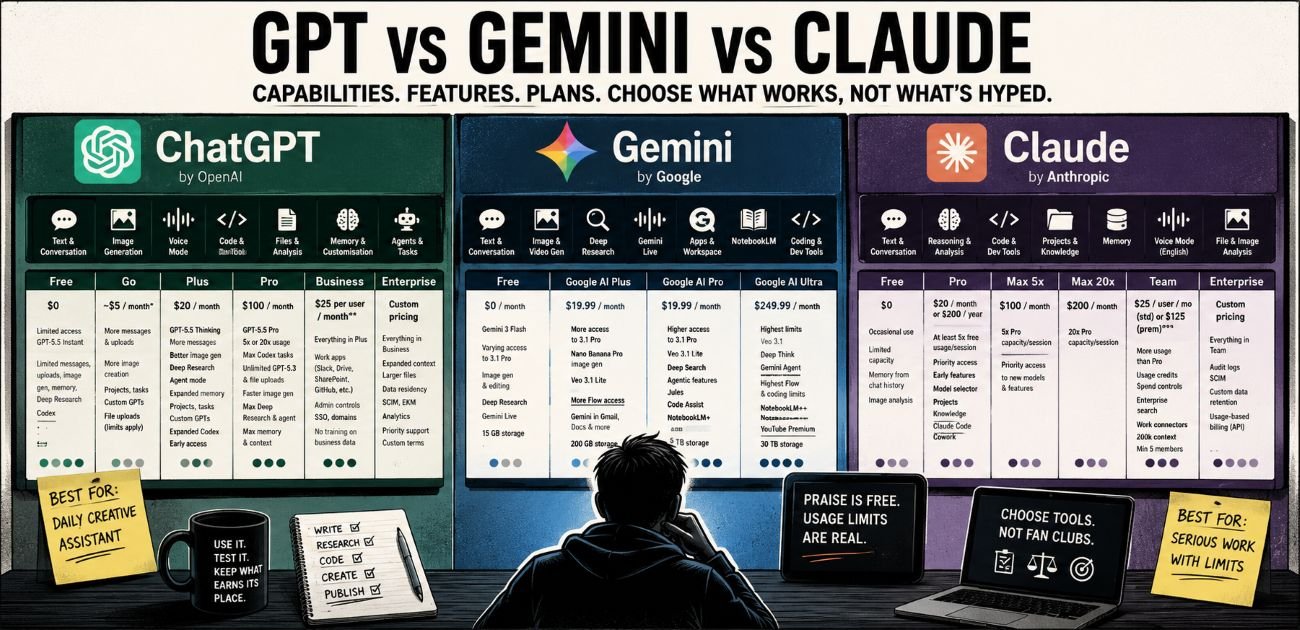
Plan map: GPT, Gemini and Claude
The useful comparison is not “which model sounds clever today”. The useful comparison is what each subscription actually gives you when the work begins.
| Platform | Plan | Main options and capabilities | Practical limit |
|---|---|---|---|
| ChatGPT | Free | Limited access to GPT-5.5 Instant, limited messages and uploads, limited and slower image generation, limited Deep Research, limited memory and context, limited Codex. | Good for casual use, weak for steady work. |
| ChatGPT | Go | More GPT-5.5 Instant access, more messages, more uploads, more image creation, longer memory. OpenAI says Go also includes file uploads, advanced data analysis, projects, tasks, custom GPTs and Library, with limits. | Best cheap middle step if available in your region, but not the full advanced model stack. |
| ChatGPT | Plus | Adds GPT-5.5 Thinking, expanded messages and uploads, better image creation, expanded Deep Research and agent mode, expanded memory and context, projects, tasks, custom GPTs, expanded Codex usage and early access. | The strongest practical option for most normal heavy users. |
| ChatGPT | Pro | Adds 5x or 20x more usage, GPT-5.5 Pro, maximum Codex tasks, unlimited GPT-5.3 and file uploads, faster image creation, maximum Deep Research and agent mode, maximum memory and context. | Powerful, but priced for people who use AI as a working engine, not a toy. |
| ChatGPT | Business | Includes Plus and Business Codex features, unlimited core chat, work apps such as Slack, Google Drive, SharePoint, GitHub and Atlassian, admin controls, SAML SSO and no training on business data. | Built for teams, not lonely midnight tinkering. |
| ChatGPT | Enterprise | Custom pricing, expanded context, larger files, data residency, SCIM, EKM, analytics, domain verification, role controls, priority support and custom legal terms. | Proper company territory. Bring meetings and procurement pain. |
OpenAI‘s public pricing page lists Free, Go, Plus, Pro, Business and Enterprise. It puts image generation, memory, file uploads, Deep Research and Codex directly inside the product ladder, which is why ChatGPT feels more complete as a daily assistant rather than only a chat box with good manners.
| Platform | Plan | Main options and capabilities | Practical limit |
|---|---|---|---|
| Gemini | Free | Access to Gemini 3 Flash, varying access to Gemini 3.1 Pro, image generation and editing, Deep Research, Gemini Live, Canvas, Gems, Flow with limited Veo access, NotebookLM and 15 GB storage. | Very generous for free use, especially if you live inside Google. |
| Gemini | Google AI Plus | More access to Gemini 3.1 Pro, Deep Research, Nano Banana Pro image generation, limited Veo 3.1 Lite, more Flow access, NotebookLM extras, Gemini in Gmail and other Google apps, Gemini in Chrome early access, 200 GB storage. | The low-cost Google middle layer. Useful, but still a measured tap. |
| Gemini | Google AI Pro | Higher access to Gemini 3.1 Pro, Deep Research, Nano Banana Pro, Veo 3.1 Lite, Flow, Deep Search, agentic features, Jules, Gemini Code Assist, Gemini CLI, NotebookLM with 5x more Audio Overviews and 5 TB storage. | Probably the best all-round rival to ChatGPT for users tied to Google tools. |
| Gemini | Google AI Ultra | Highest limits, Veo 3.1, Deep Think, Gemini Agent in the US and English only, highest Flow access, highest coding limits, NotebookLM highest limits, Google Home Premium Advanced, Project Genie in the US, YouTube Premium in supported countries and 30 TB storage. | Huge feature pile, huge price, very Google-shaped. |
Gemini‘s plan ladder is the broadest bundle: chat, image, video, search, NotebookLM, Google apps, storage, coding tools and, at the top, YouTube Premium. That makes it less like a single assistant and more like Google trying to wrap the whole house in AI wallpaper.
| Platform | Plan | Main options and capabilities | Practical limit |
|---|---|---|---|
| Claude | Free | $0 plan for occasional use with limited capacity. Claude also has memory from chat history available to all users and can analyse uploaded images. | Good for testing, but not a real daily work plan. |
| Claude | Pro | $20/month or $200/year. At least 5x the free usage per session, priority access, early features, model selector, projects, knowledge bases, Claude Code and Cowork. | Strong for writing, coding and reasoning, but still not generous if you push hard. |
| Claude | Max 5x | $100/month, with 5x Pro capacity per session and priority access to new models and features. | For frequent users who hit Pro walls. |
| Claude | Max 20x | $200/month, with 20x Pro capacity per session. | For daily heavy users who want Claude as a main work partner. |
| Claude | Team | Minimum 5 members. Standard seats are $25 per member monthly or $20 billed annually. Premium seats are $125 monthly or $100 billed annually. Includes more usage than Pro, usage credits, spend controls, enterprise search, workplace connectors, Claude Code, Cowork, projects, knowledge bases and 200k context. | Serious team plan, but the minimum-seat rule matters. |
| Claude | Enterprise | Includes Team features plus audit logs, SCIM, custom data retention, spend controls, workplace connectors and usage-based billing at API rates on top of seat access. | Enterprise is not a simple subscription. It is a meter with a suit on. |
Claude‘s problem is not ability. It is shape. It can write, reason, code, use projects, use memory and talk by voice in English, but Anthropic’s own help page says Claude doesn’t generate photos or illustrations like image-generation tools. It can make diagrams, charts and interactive visuals with HTML and SVG, but that is not the same as asking for a featured image and receiving one.
The blunt reading is this: ChatGPT is the strongest daily creative assistant, Gemini is the strongest bundle, and Claude is the strongest “serious room” for text, reasoning and coding if you can live inside its limits. The mistake is treating praise as proof. Praise is cheap. Usage limits are where the truth starts charging rent.
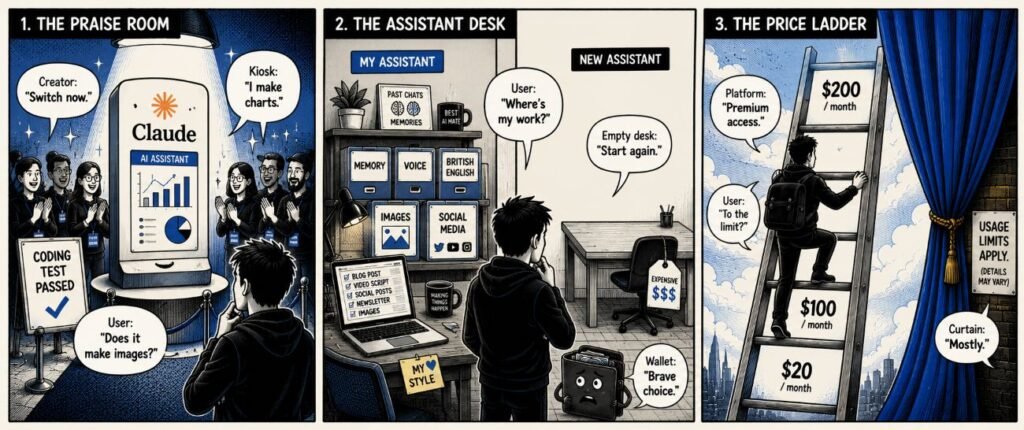
The sketch
Scene 1: The praise room
Panel description. A shiny Claude kiosk stands under a spotlight while creators clap. A small sign beside it reads “coding test passed”.
Dialogue:
Creator: “Switch now.”
User: “Does it make images?”
Kiosk: “I make charts.”
Scene 2: The assistant desk
Panel description. One desk is full of labelled folders: memory, voice, British English, images and social media. Another desk is clean, empty and expensive.
Dialogue:
User: “Where’s my work?”
Empty desk: “Start again.”
Wallet: “Brave choice.”
Scene 3: The price ladder
Panel description. A user climbs a tall ladder marked $20, $100 and $200 while a polished curtain hides a small usage-limit sign.
Dialogue:
Platform: “Premium access.”
User: “To the limit?”
Curtain: “Mostly.”
What to watch, not the show
- Pricing ladders that turn useful access into a luxury habit.
- Feature praise that comes from coders but is repeated as if every user has the same needs.
- Memory lock-in, where the best assistant is the one that already knows your work.
- Voice tools that sound impressive but still struggle with real accent, language and workflow needs.
- Image generation becoming a core feature rather than a decorative extra.
- The quiet split between tools made for daily users and tools priced for professional intensity.
The Hermit take
Claude is good. The praise is louder than the practical case.
A clever model is useful; a costly partial assistant is still a partial assistant.
Keep or toss
Verdict: Keep / Toss.
Keep Claude for coding checks and comparison.
Toss the idea that praise alone makes it the better daily assistant.
Sources
- OpenAI ChatGPT release notes: https://help.openai.com/en/articles/6825453-chatgpt-release-notes
- OpenAI ChatGPT pricing: https://chatgpt.com/pricing/
- OpenAI ChatGPT Pro tiers: https://help.openai.com/en/articles/9793128-about-chatgpt-pro-tiers
- Anthropic Claude image production: https://support.claude.com/en/articles/9002504-can-claude-produce-images
- Anthropic Claude plans: https://support.claude.com/en/articles/11049762-choosing-a-claude-plan
- Anthropic Claude voice mode: https://support.claude.com/en/articles/11101966-using-voice-mode
- Anthropic Claude language settings: https://support.claude.com/en/articles/10769299-how-to-use-claude-in-your-preferred-language
- Anthropic Claude memory and past chat search: https://support.claude.com/en/articles/11817273-use-claude-s-chat-search-and-memory-to-build-on-previous-context
- Google Gemini subscriptions: https://gemini.google/subscriptions/
One response
[…] rationed like wartime butter, but with a friendlier button. We’ve seen the pattern with Claude. Users were sold into the idea of more usage, more power, more features, more professional flow. […]